
Tacque
Make your Mac keyboard sound mechanical
Mac
Version 1.2
macOS 15.0 or later
28.1 MB
1 languages
Tacque is a keyboard sound app for Mac. Add crisp mechanical switch sounds to every keystroke, whether you’re writing, coding, browsing, or chatting. Choose a sound pack, set the volume, and give a flat keyboard a little more character.
Add mechanical sounds to every keystroke
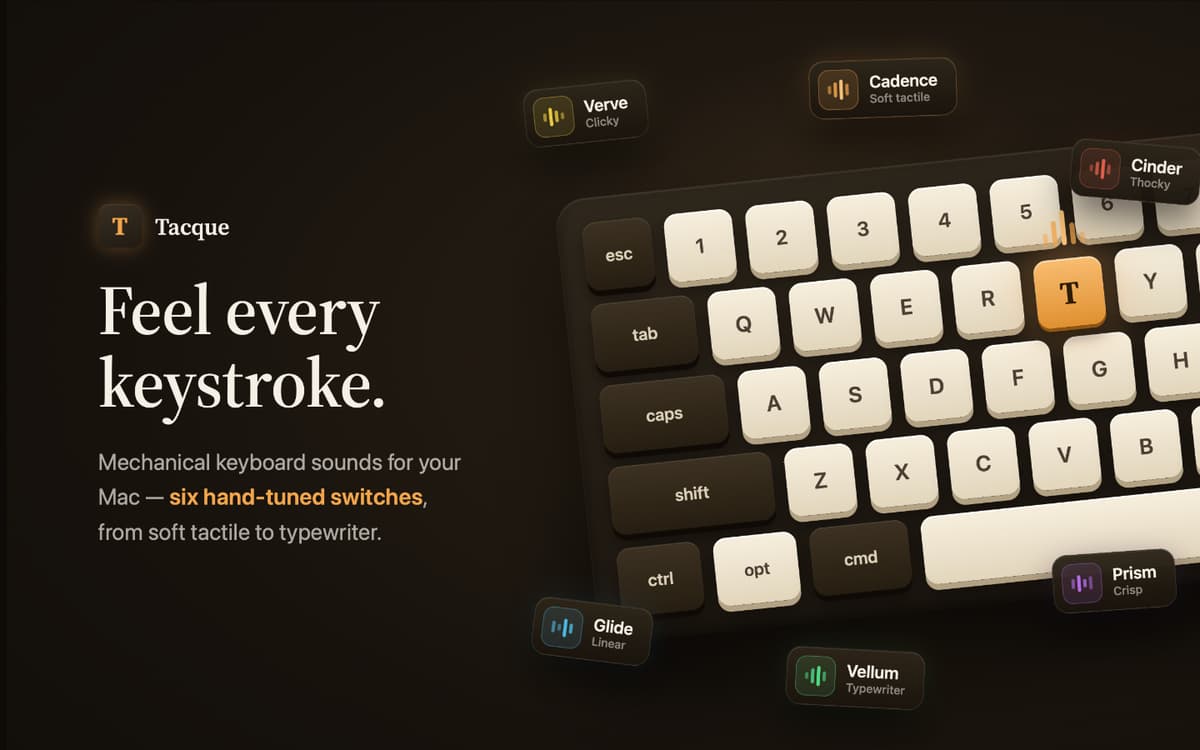
Choose from distinct switch sound packs
Import custom sounds from files or links
Pause automatically during calls and media
Tacque features
Make every keystroke click
Tacque plays a mechanical switch sound whenever you press a key. It works across your Mac, so the satisfying clicks follow you from your editor to your browser and everywhere else you type.
Find your kind of keyboard
Pick from hand-tuned sound packs ranging from soft and thocky to sharp and clicky. Regular keys, Space, Enter, Backspace, and modifiers use distinct sounds to keep the experience natural.
Hear a more realistic board
Each key has its own subtle pitch. The same key stays consistent, while different keys sound slightly different. Stereo positioning places left- and right-side keys in the matching part of the soundstage.
Bring your own sounds
Import custom sound packs from a file on your Mac or directly from a link. Tacque supports popular community pack formats, giving you plenty of switch sounds to explore.
Know when to stay quiet
Tacque can mute itself automatically while your microphone is in use or when music and video are playing. You can also turn keyboard sounds on or off instantly from the menu bar.
Test sounds as you type
Open the menu bar popover and start typing to preview the selected pack. A live waveform responds to every keystroke, while quick controls let you adjust the volume without interrupting your flow.
Get hundreds of apps with Membership
Become Setapp member and use hundreds of stellar apps with one subscription.
Try 7 days free, then pay one simple fee.
Install Setapp on Mac
Explore apps for Mac, iOS, and web. Find easy ways to solve daily tasks.

Get the app you came for
That one shiny app is waiting inside Setapp. Install with a click.

Tacque
Choose your subscription
One app or more with a Setapp membership. Get apps the way you want.

Get hundreds of apps with Membership
Become Setapp member and use hundreds of stellar apps with one subscription.
Try 7 days free, then pay one simple fee.
1
Install Setapp on Mac
Explore apps for Mac, iOS, and web. Find easy ways to solve daily tasks.
2
Get the app you came for
That one shiny app is waiting inside Setapp. Install with a click.
Tacque
3
Choose your subscription
One app or more with a Setapp membership. Get apps the way you want.
Home to the top apps
From planning and routine tasks to creative pursuits and coding, tackle tasks with apps on Setapp.


Tacque
Make your Mac keyboard sound mechanical