- A single app subscription through Setapp Marketplace lets you subscribe to or purchase one specific app.
You choose the billing term and number of devices, and you only get access to that app. Setapp Membership, on the other hand, gives you access to the entire catalog of 250+ apps under one flat subscription. Instead of paying per app, you unlock everything at once.
- Setapp Marketplace gives you flexibility and precision.
Setapp Marketplace works best for short-term projects, specific device licensing needs, or when you only require one focused tool (or a couple). You still get the full version of the app, updates, ad-free access, and support.
- Setapp Membership maximises value for multi-app workflows.
Setapp Membership includes 250+ Mac, iOS, and web apps with no ads or in-app purchases. You can install, uninstall, and test apps freely while paying one predictable fee. If you use two or more apps consistently, Membership often becomes more cost-effective.
- Best way to decide: Test and calculate your break-even point.
Add up what you would spend on individual subscriptions. If your total approaches or exceeds the Membership price, switching makes financial sense. You can try all Setapp apps free for 7 days and compare both models risk-free.
In March 2026, Setapp launched the Setapp Marketplace. Now you have two ways to access apps:
- Setapp Membership, which unlocks access to over 250 curated apps for Mac, iOS, and web through a single affordable subscription.
- Setapp Marketplace, which allows users to subscribe to a single app for a specific period (1, 3, 6, or 12 months) or purchase an individual app separately.
At first glance, deciding which option to choose may seem straightforward. But once you factor in pricing, flexibility, and long-term usage, the choice becomes more strategic.
In this guide, I’ll break down:
- How Setapp Membership compares to Setapp Marketplace and explain how each works.
- Real cost comparison based on 2026 Marketplace pricing.
- Break-even scenarios.
- Ideas for saving money with either model.
By the end, you’ll have enough information to make a financially sound decision.
What is the Setapp Marketplace and single app subscription?
Setapp Marketplace is a new way to get apps on Setapp that allows you to subscribe to apps individually or purchase them separately instead of signing up for the full Setapp membership.
Currently, Setapp Marketplace includes over 70 apps that can be purchased or subscribed to individually. Among them are Moonlock, CleanMyMac, Gemini, Joycast, Downie, CodeRunner, Clobbr, Movie Explorer Pro, Bartender, Elmedia Player, CloudMounter, SlouchSniper, AdLock, CameraBag Pro, WidgetWall, Backtrack, and others. You can check out the full list here.
With Setapp Marketplace, you:
- Choose a specific app and subscribe to it or buy it outright.
- Get an app that is fully functional and follows the same model as the version included in the Setapp Membership. You can reinstall an app later without repurchasing it, as long as it’s within your billing period.
- Get app updates through Setapp.
- Get first-line technical support from the Setapp team. Anything related to license activation, purchase management, and similar issues is handled directly by Setapp. This means you don’t have to reach out to multiple support teams if you run into a minor issue with your subscription.
- Receive a separate bill for each app, but all charges are consolidated within your Setapp profile under one roof, rather than scattered across different emails, accounts, or platforms.
At the same time, Marketplace retains the best features of a Setapp membership. You get premium versions of apps with no ads or in-app purchases. Updates are delivered automatically and install in the background — you don’t need to lift a finger.
In other words, Setapp Marketplace is a precision tool: you pick exactly what you need and use only those apps.
What is Setapp Membership?
Setapp Membership gives you access to 250+ curated Mac, iOS, and web apps under a single subscription. The arrival of Setapp Marketplace doesn’t affect Setapp Membership users, and all its features remain unchanged.
With a Setapp Membership, you get:
- Access to the entire catalog of 250+ macOS, iOS, and web apps
- No ads
- No in-app purchases
- Automatic updates that install in the background without distracting you
- Cross-device support for select apps
- Continuous catalog updates, with new apps added regularly
- A 7-day free trial with unlimited access to the entire catalog
Instead of paying per app, with Setapp Membership, you pay a single flat monthly or annual fee and use as many apps as you want. The philosophy behind Membership is simple: eliminate friction, reduce decision fatigue, and replace multiple app subscriptions with one ecosystem.
Setapp Marketplace and Setapp Membership: 2026 Comparison
The table below highlights the key differences — and the benefits that stay the same — so you can quickly see which model fits your workflow best.
| Feature | Setapp Marketplace (Single app) | Setapp Membership |
| Access | 1 app (or several apps you select yourself) | Entire library: 250+ apps for macOS, iOS & web |
| Pricing | Pay per app | One flat monthly or annual fee |
| Monthly cost logic | Pay only for the selected app | Fixed price regardless of how many apps you use |
| Billing | Separate charge per app (consolidated in your Setapp account) | Single invoice |
| Best for | Focused, single-tool users | Multi-app, evolving workflows |
| AI credits | Not currently included | Included in eligible plans |
| Device limits | Vendor-defined | Plan-based (Mac, Mac + iOS, Power User) |
| App updates | Included | Included |
| Features | Full version | Full version |
| App experimentation | Limited to chosen apps | Unlimited installation, uninstalling, and testing |
| Ads | No ads | No ads |
| In-app purchases | None | None |
| Security review | Vetted & Apple-notarized | Vetted & Apple-notarized |
| Build review before release | Yes | Yes |
| Payment security | Encrypted & protected | Encrypted & protected |
| Reinstall while active | Yes | Yes |
| If app leaves platform | Installed version works (no updates) | Installed version works (no updates) |
When a single app subscription from Setapp Marketplace makes perfect sense
Let’s start with scenarios where subscribing to just one app is the smarter move.
1. Short-term projects (1–3 months)
Imagine:
- You’re working on a client project.
- You need a specialized utility.
- You only need it temporarily.
But a Setapp Membership may not feel cost-effective for a single app, and the official developer doesn't offer a short-term plan.
Take Luminar Neo as an example. On the developer's website, it's sold as a perpetual bundled desktop license for Windows and macOS starting at $238 (with occasional discounts of up to 50%). But what if you only need it for a month or two while editing your granny's birthday photos? You can subscribe to Luminar Neo through the Setapp Marketplace for $5.69 per month. BTW, in this case, even the annual subscription at $46.99 can work out better if you're on Mac only — you won't be paying extra for a Windows license you don't need.
2. You only need one app or a couple of them
Sometimes, a bundle of two or three apps can cost less than a full Setapp subscription.
Let’s take Gemini 2, which finds duplicate files on your Mac, and SlouchSniper, which helps improve your posture while working on your MacBook, as an example. Their costs on Setapp Marketplace:
- Gemini 2 — $23.40 per year
- SlouchSniper — $34.99 per year for two devices (cheaper than the developer’s price!).
- Total: $58.39 per year (about $4.90 per month)
It saves you at least $49.50 compared to an annual Setapp subscription.
The same logic applies to apps you install just to make everyday tasks a little more fun. JoyTap, which adds mechanical keyboard sounds to your Mac’s keyboard, is a good example.
People love it (it is rated 92% on Setapp), and it’s affordable: $5 a year for up to three Macs, or you can buy it outright for $10. If JoyTap is the only app you need, a membership wouldn’t be worth it.
3. Device-specific licensing needs
In some cases, Setapp offers a different subscription model or number of devices than either the full Setapp membership or the developer’s official pricing.
A good example is Coherence X, an app that lets you turn websites into desktop apps on your Mac. Here are the accesses you can get:
- Setapp Membership — Coherence X for 1 Mac or for up to 4 Macs, depending on the plan.
- Developer’s offer — 1-, 2-, or 5-Mac licenses.
You can probably see where this is going. If you need a 3-device licence on Coherence X only, you’ll likely overpay — both with Setapp Membership and the developer’s price. Setapp Marketplace fills this gap.
Setapp Marketplace gives you the option to get Coherence X for three devices — something neither the membership plans nor the developer’s standard tiers cover.
When Setapp Membership makes more sense than a single app subscription
Now, let’s look at when the access to the entire Setapp library becomes dramatically more cost-effective.
Rule of thumb #1: If you use 2+ apps, recalculate immediately
If you’re subscribed to more than two or three apps, there’s a good chance that a Setapp membership will be more cost-effective, easier to manage, and more time-efficient than paying for everything separately.
Use a couple of free, simple tools to see whether you’re overpaying:
- App budget tracker: Enter the prices of the apps you’re using now, and estimate your total app expenses per month, week, or year.
- Alternative Finder: Check whether a non-Setapp app you’re currently using can be replaced with a Setapp alternative. If it can, chances are you’ll save with a Setapp membership.
A Setapp Membership gives you access to hundreds of apps for roughly what you'd pay for just one.
Rule of thumb #2: If you are a professional, consider a Membership
If you rely heavily on apps for your professional work, a membership is likely the better choice.
As a writer, for example, here’s just a partial list of the apps I use for writing alone: Paste, PopClip, Gifox, CleanShot X, Ulysses, Bolt AI, WhisperTranscribe, and Plus.
If I added Mac maintenance tools, a VPN, time trackers, PDF editors, and everything else that supports my workflow, I’d be paying hundreds of dollars per year. Or dealing with much more complicated setups and trade-offs.
Instead, I choose a subscription that gives me almost every tool I might need for my job.
If you’re a professional, check out these guides to help you build your own Setapp-based workflow:
Rule of thumb #3: If you explore tools and want predictable billing, switch to Membership
The ability to explore new tools endlessly is one of the best features of a Membership. Think of it this way:
A. Whenever you have a task or run into an issue, you open your Setapp desktop app, type in what you need, and find a tool that can help you solve it.
B. New apps are added to Setapp regularly. Every month, new tools become available.
As it stands today, the app library is already comprehensive and fully developed. It includes apps for writing, development, design, time tracking, screenshots, Mac maintenance, and dozens of other tasks.
On top of that, new apps are added every month, giving you ongoing opportunities to improve your workflow — without any change in price. No matter how many apps you install, uninstall, or reinstall, you still pay the same flat fee.
How does a Single App subscription on Setapp Marketplace work?
A single-app subscription on Setapp allows you to subscribe to one specific app instead of purchasing the full Setapp membership. Here’s how Single App subscription works:
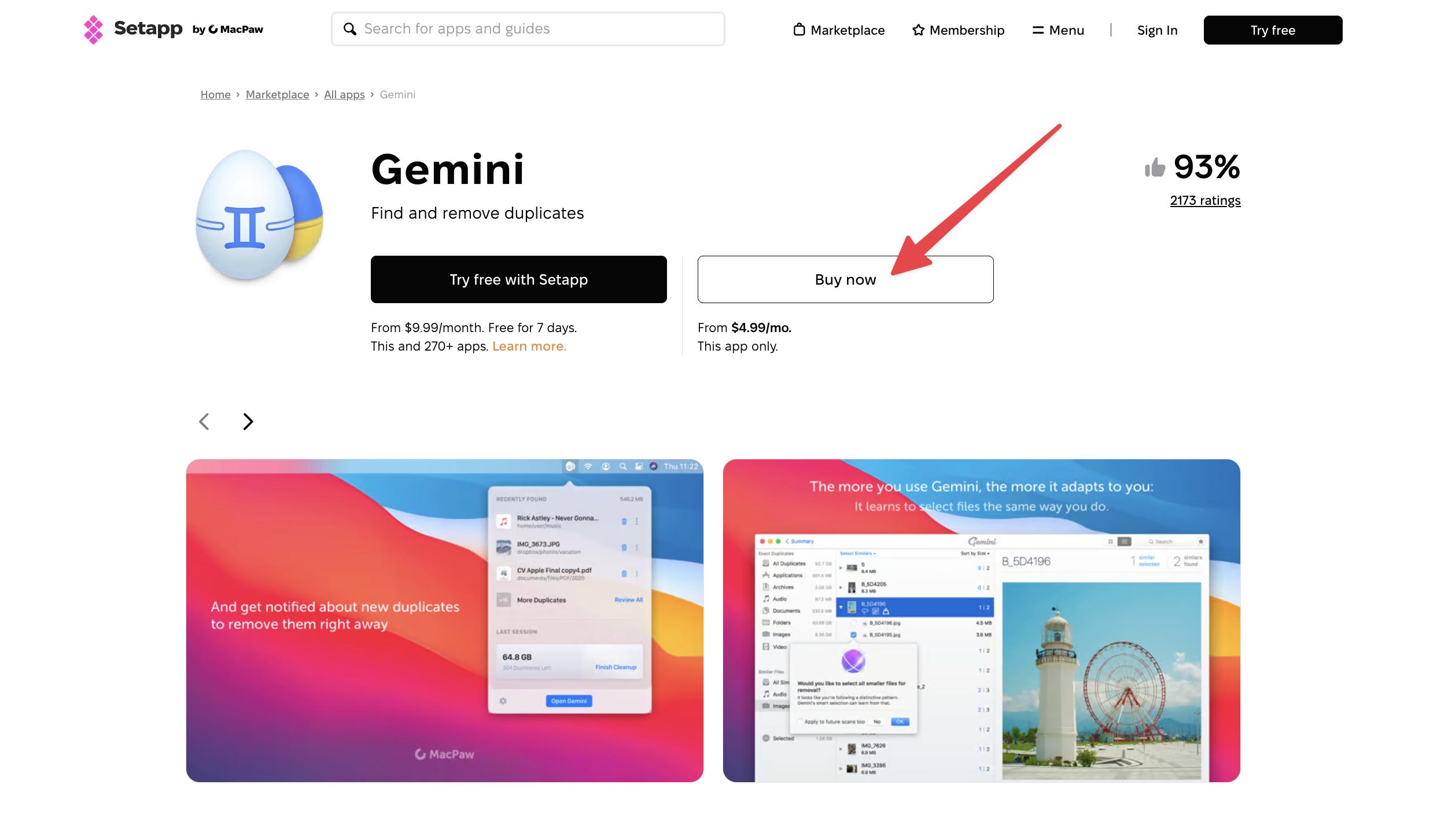
Step 1. Choose an app from the Setapp Marketplace. At the moment, more than 70 apps can be subscribed to or purchased individually. You’ll see a Buy button next to available apps.
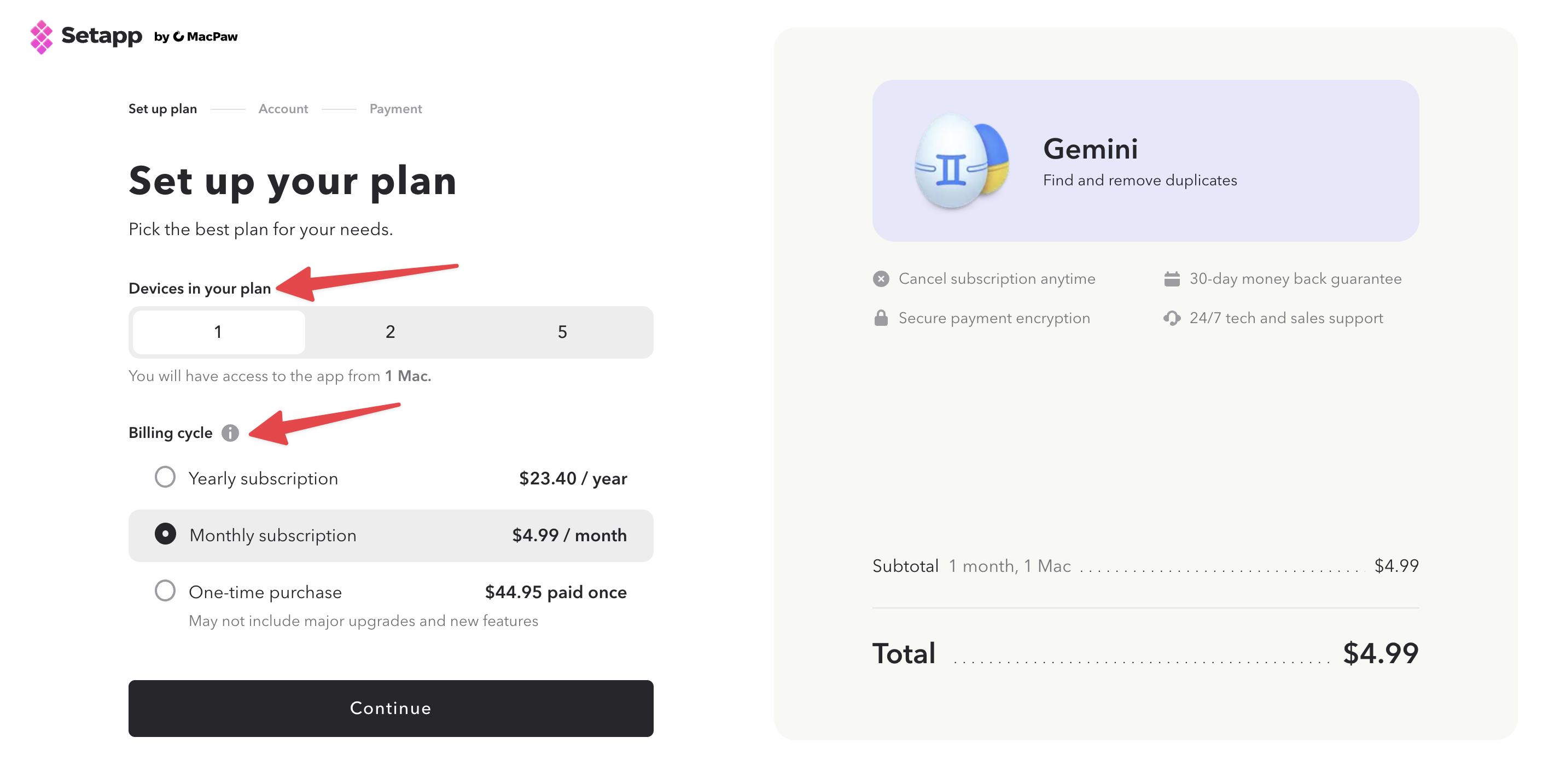
Step 2. Select and set up your plan. Choose the number of devices you want to include and your billing cycle. Depending on the app, subscription terms may be available for 1, 3, 6, or 12 months. The number of supported devices may also vary.
Step 3. Sign in to your Setapp account or create one. You can sign up using Google, Apple, or your email address.
Step 4. Complete your purchase.
Step 5. Download the app. Once installed, it’s ready to use.
Please note that the app is tied to your Setapp account and works through the Setapp platform, so you’ll need Setapp installed for the app to function properly.
How many apps does a Single App subscription include?
A single-app subscription allows you to subscribe to selected apps individually and gives you access only to the apps you choose to subscribe to or purchase. It does not include access to the full 250+ app Setapp catalog.
Currently, more than 70 Setapp apps are available for individual purchase or subscription.
You can subscribe to as many of these apps as you’d like. However, this model typically works best if you need only a few apps, need certain tools for a limited period of time, or have specific device-licensing requirements.
If you plan to use multiple apps — five, ten, or more — it’s generally worth recalculating your costs and considering whether a full membership would be more budget-friendly.
For how many devices, months, or years can I subscribe with a Setapp Single App subscription?
The short answer is: it depends on the app.
Device availability. Some single-app plans cover one device (Mac), while others support multiple devices — typically up to five.
Billing terms. Many apps offer monthly, quarterly, semiannual, or annual subscription options.
One-time purchase. Certain apps are also available as a one-time purchase instead of a subscription.
How many individual app subscriptions can a user have?
There is no strict limit on how many single app subscriptions a user can have.
You can:
- Subscribe to one app
- Subscribe to several apps
Each app will:
- Be billed separately
- Have its own subscription cycle
- Have its own invoice
There is no bundled discount for multiple single apps. However, if multiple billing options for the app are available, for example, 1-, 3-, 6-, or 12-month plans, the longer subscription term is typically more cost-effective.
Can I mix subscription durations (e.g., one app monthly, another yearly)?
Yes, you can mix billing periods.
Example:
Each subscription:
- Is independent
- Has its own billing cycle
- Has its own renewal date
- Is charged separately
There is no requirement to align billing periods.
Which subscription should you choose in 2026: A single app or a Setapp membership?
The answer comes down to a few key questions: How many apps will you use? For how long? And on how many devices?
A single-app subscription makes perfect sense if:
- You only need one or two apps and their total cost is lower than a Setapp Membership.
- You need a couple of apps for a short-term project. Take Luminar Neo: on the developer's website, the full price for a perpetual desktop license starts at $238 (no subscription options). But through the Setapp Marketplace, you can subscribe for just $5.69 per month. If you only need it for a month while finishing an editing project, that may be all you need.
- You have specific licensing needs. The Setapp Power User membership covers up to four Macs, which still might not match your exact needs. If you don’t want to overpay for unused licenses (or, vice versa, need more licenses), a single-app subscription could be the better fit.
Ultimately, I encourage you to calculate your potential spending, factor in your specific needs, and choose the option that’s both budget-friendly and practical.
In any case, you can try all Setapp apps free for 7 days and then decide which plan works best for you — a single-app subscription or a full Setapp membership.
FAQ
Is it cheaper to subscribe to one app on Setapp Marketplace or to the full Setapp plan?
A single-app subscription is typically more affordable than a full Setapp membership if:
- You only need one specific app
- You need a couple of apps for a short period of time
- You require a specific billing term or a particular number of supported devices
For example, the highest Setapp membership tier, Power User, allows you to use apps on up to four Macs. With a single-app subscription, however, some apps may support up to five devices and offer more flexible billing terms. Instead of choosing a recurring monthly or annual Setapp membership, you might find that a three- or six-month subscription hits the sweet spot and offers better value for your needs.
Can I try apps that are available as a single-app subscription for free?
You can try the entire Setapp catalog (250+ apps, including those available for a single-app subscription) during a 7-day free trial. During this trial period, you can test any apps you're considering for a single-app subscription.
Are individual subscriptions on Setapp Marketplace more expensive in the long term?
Single-app subscriptions can become more expensive in the long run if you subscribe to multiple apps separately. The costs add up over time, and you may end up paying more than you would for a Setapp membership.
A single-app subscription is the best choice if you only need one specific app, a couple of apps for a short period, or a particular billing term or number of supported devices.
We recommend comparing your needs with the available pricing options and choosing the plan that makes the most sense for you.
Are there discounts for longer plans (3, 6, or 12 months) on Setapp single app subscriptions?
Discounts for longer plans are vendor-specific, but longer billing periods (6 or 12 months) often offer savings compared to monthly billing.
Can I switch from a single-app subscription to a full Setapp Membership?
Yes — at any time. After switching from a single-app subscription to a full Setapp Membership:
- You get access to the entire Setapp catalog — 250+ apps for Mac, iOS, and web.
- Your existing single-app subscription remains active until the end of its current billing cycle.
- It does not automatically cancel when you purchase Membership.
Does Setapp give you the full version of Bartender and other included apps?
Yes, on Setapp, you get Bartender 6 with pro tools like Top Shelf — the newest version of the app with its latest pro features. And while on Setapp, you'll get all major updates to Bartender automatically. The same applies to other Setapp apps.






 Best solution
 Best solution